So far, we’ve requested a certificate covering a specific domain and its www subdomain. That works fine when you know exactly which hostnames you need. But what happens when your frontend grows? You might need staging.example.com for a staging environment, api.example.com for your backend, or docs.example.com for your documentation site. Requesting a new certificate for every subdomain gets tedious fast.
If you want AWS’s official framing for the certificate behavior in this lesson, the AWS Certificate Manager User Guide is the source of truth.
ACM supports two strategies for covering multiple hostnames: wildcard certificates and Subject Alternative Names (SANs). Each has tradeoffs, and knowing when to use which will save you from unnecessary certificate management overhead.
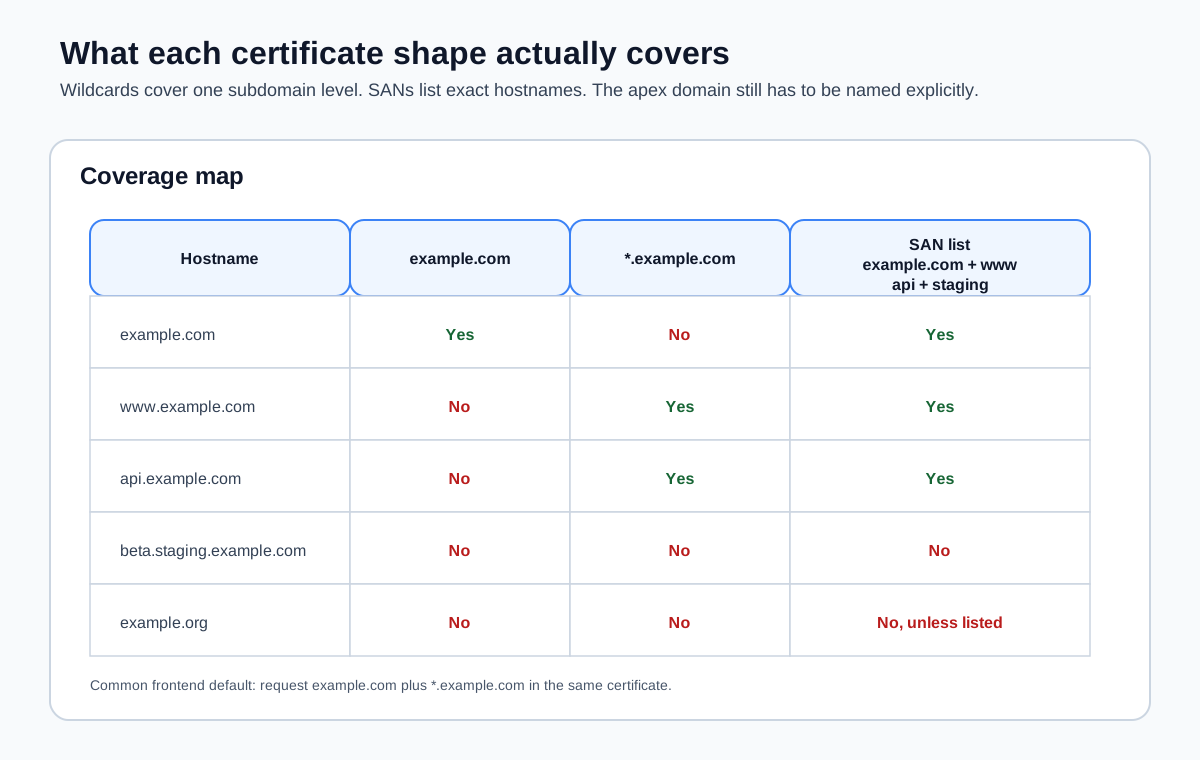
Wildcard Certificates
A wildcard certificate covers a domain and all of its subdomains at one level. The syntax uses an asterisk: *.example.com.
aws acm request-certificate \
  --domain-name "*.example.com" \
  --validation-method DNS \
  --region us-east-1 \
  --output json
This single certificate covers:
www.example.comstaging.example.comapi.example.comdocs.example.com- Any other subdomain of
example.com
You can create new subdomains at any time and they are automatically covered by the existing certificate. No new certificate request, no new validation, no waiting.
What Wildcards Don’t Cover
Wildcards match exactly one level of subdomain. *.example.com covers www.example.com but not these (and this catches people off guard):
example.com(the apex domain itself)beta.staging.example.com(two levels deep)
If you want both the apex domain and all subdomains, you need to include both in the certificate request:
aws acm request-certificate \
  --domain-name example.com \
  --subject-alternative-names "*.example.com" \
  --validation-method DNS \
  --region us-east-1 \
  --output json
This certificate covers example.com and every single-level subdomain. This is the most common pattern for frontend deployments—you want your site to work at both example.com and www.example.com, and you want room to add more subdomains later.
The --domain-name value is the primary domain on the certificate. The --subject-alternative-names list adds additional domains. The primary domain is automatically included in the SANs, so you don’t need to list it twice.
Wildcard Validation
DNS validation for a wildcard certificate works the same way as for a specific domain. ACM generates a CNAME record for the wildcard domain, and you add it to your DNS. The record looks like this:
| Record Name | Record Type | Record Value |
|---|---|---|
_abc123.example.com | CNAME | _def456.acm-validations.aws |
Notice the validation record is for example.com, not *.example.com. ACM validates that you control the parent domain, which is sufficient to prove you control all subdomains under it.
If your certificate includes both example.com and *.example.com, ACM may generate just one CNAME record that validates both, since they share the same parent domain.
Subject Alternative Names (SANs)
Subject Alternative Names let you list specific hostnames on a single certificate. Instead of a wildcard, you enumerate exactly which domains the certificate should cover:
aws acm request-certificate \
  --domain-name example.com \
  --subject-alternative-names www.example.com staging.example.com api.example.com \
  --validation-method DNS \
  --region us-east-1 \
  --output json
This certificate covers exactly four hostnames: example.com, www.example.com, staging.example.com, and api.example.com. Nothing else.
Each SAN that belongs to a different domain requires its own DNS validation record. If all the SANs are subdomains of the same domain, you may get fewer validation records (ACM deduplicates when it can).
ACM’s SAN Limits
ACM allows up to 10 domain names per certificate by default (the primary domain name plus up to 9 additional SANs). You can request a limit increase through AWS Support if you need more, up to a maximum of 100.
For most frontend projects, 10 is more than enough. If you are hitting this limit, a wildcard certificate is probably the better approach.
When to Use Each
Use a wildcard certificate when:
- You expect to add subdomains over time and don’t want to reissue the certificate
- You are running multiple environments on subdomains (
staging.example.com,preview.example.com) - You want a single certificate that covers any future subdomain without planning ahead
Use specific SANs when:
- You need to cover domains that aren’t subdomains of the same parent (e.g.,
example.comandexample.org) - Your security policy requires that certificates list only the exact hostnames in use
- You want an audit trail of exactly which hostnames a certificate covers
Use both together when:
- You want the apex domain, all subdomains, and one or more unrelated domains on the same certificate
aws acm request-certificate \
  --domain-name example.com \
  --subject-alternative-names "*.example.com" docs.another-domain.com \
  --validation-method DNS \
  --region us-east-1 \
  --output json
This covers example.com, every subdomain of example.com, and docs.another-domain.com. You’ll need DNS validation records in both example.com and another-domain.com DNS zones.
The Common Frontend Pattern
For a typical frontend deployment on AWS, here’s what I’d recommend:
aws acm request-certificate \
  --domain-name example.com \
  --subject-alternative-names "*.example.com" \
  --validation-method DNS \
  --region us-east-1 \
  --output json
This gives you one certificate that covers the apex domain and any subdomain. You can point www.example.com at your CloudFront distribution today, spin up staging.example.com next week, and add api.example.com next month—all without touching ACM again.
Remember from Requesting a Certificate in ACM: certificates for CloudFront must be in us-east-1. This applies to wildcard certificates and multi-SAN certificates equally. Always specify --region us-east-1.
Verifying Your Certificate
After validation completes, verify that the certificate covers the domains you expect:
aws acm describe-certificate \
  --certificate-arn arn:aws:acm:us-east-1:123456789012:certificate/a1b2c3d4-e5f6-7890-abcd-ef1234567890 \
  --region us-east-1 \
  --output json \
--query "Certificate.SubjectAlternativeNames"["example.com", "*.example.com"]If a domain is missing, you can’t add it to an existing certificate. You’ll need to request a new certificate with the correct list of domains and replace the old one on your CloudFront distribution. This is another reason to start with a wildcard—it gives you room to grow without replacing certificates.