You’ve requested a certificate in ACM and it’s sitting at Pending validation. ACM needs you to prove that you own the domain before it’ll issue the certificate. This isn’t an AWS-specific requirement—every Certificate Authority does this. The question is how you prove it. ACM gives you two options: DNS validation and email validation. DNS validation is almost always the right choice, and by the end of this lesson you’ll understand why.
If you want AWS’s version of the validation behavior while you read, the ACM DNS validation guide is the canonical reference.
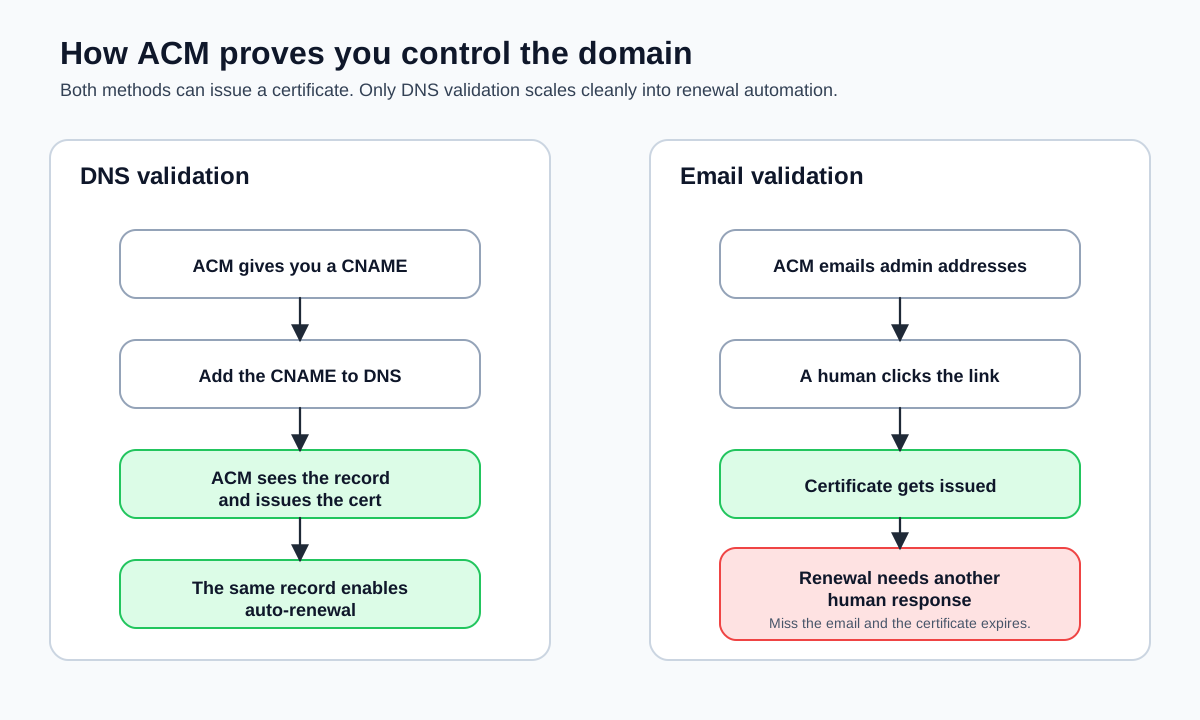
What Validation Actually Proves
When you request a certificate for example.com, ACM needs to verify that the person making the request actually controls that domain. Without this step, anyone could request a certificate for google.com or your-bank.com and use it to impersonate those sites. Domain validation is what makes the TLS trust model work.
Both validation methods answer the same question: “Can you demonstrate control over this domain?” They just use different signals to answer it.
DNS Validation: The Preferred Approach
With DNS validation, ACM gives you a CNAME record to add to your domain’s DNS configuration. The record looks something like this:
| Record Name | Record Type | Record Value |
|---|---|---|
_abc123.example.com | CNAME | _def456.acm-validations.aws |
You add this CNAME record to your DNS, and ACM periodically checks whether the record exists. Once it finds the record, it considers the domain validated and issues the certificate. The whole process usually takes a few minutes, though it can take up to 30 minutes depending on DNS propagation.
Here is how to retrieve the validation records from a pending certificate:
aws acm describe-certificate \
  --certificate-arn arn:aws:acm:us-east-1:123456789012:certificate/a1b2c3d4-e5f6-7890-abcd-ef1234567890 \
  --region us-east-1 \
  --output json \
  --query "Certificate.DomainValidationOptions"
The --query flag filters the output to just the validation options, which is what you care about right now:
[
  {
    "DomainName": "example.com",
    "ValidationDomain": "example.com",
    "ValidationStatus": "PENDING_VALIDATION",
    "ResourceRecord": {
      "Name": "_abc123.example.com.",
      "Type": "CNAME",
      "Value": "_def456.acm-validations.aws."
    },
    "ValidationMethod": "DNS"
  }
]
If your domain is managed in Route 53, the ACM console offers a Create records in Route 53 button that adds the CNAME records for you with a single click. From the CLI, you can do the same thing if your hosted zone is in Route 53:
aws route53 change-resource-record-sets \
  --hosted-zone-id Z1234567890ABC \
  --region us-east-1 \
  --output json \
  --change-batch '{
    "Changes": [
      {
        "Action": "UPSERT",
        "ResourceRecordSet": {
          "Name": "_abc123.example.com.",
          "Type": "CNAME",
          "TTL": 300,
          "ResourceRecords": [
            {
              "Value": "_def456.acm-validations.aws."
            }
          ]
        }
      }
    ]
  }'
If your DNS is hosted elsewhere (GoDaddy, Cloudflare, Namecheap), you add the CNAME record through that provider’s DNS management interface. The record name and value come from the ACM output above.
Some DNS providers require you to enter the CNAME name without the trailing dot and without your domain suffix. If ACM tells you to create _abc123.example.com., you might need to enter just _abc123 in your DNS provider’s interface. Check your provider’s documentation if the record isn’t being found.
Why DNS Validation Is Better
DNS validation wins on three fronts:
Auto-renewal: This is the big one. ACM uses the same CNAME record to re-validate the domain when the certificate comes up for renewal. As long as the record stays in your DNS, ACM renews the certificate automatically—no human intervention, no emails to respond to, no risk of the certificate expiring because someone was on vacation.
No email infrastructure required: Email validation requires that someone receive and click a link in an email sent to specific addresses at your domain. If you don’t have email set up for your domain (and many frontend engineers running side projects don’t), email validation is a non-starter.
Scriptable: You can automate the entire certificate request and validation process with the CLI. Request the certificate, extract the CNAME records, create them in Route 53, wait for validation—all in a shell script or CI pipeline. Email validation requires a human clicking a link.
Email Validation: When You Might Need It
With email validation, ACM sends an email to a set of predefined addresses associated with the domain:
admin@example.comadministrator@example.comhostmaster@example.compostmaster@example.comwebmaster@example.com
It also sends to the domain’s WHOIS contact addresses (if they’re not privacy-protected, which they almost always are these days).
The email contains a link. Click the link, and the domain is validated. Simple enough in theory, but fragile in practice.
Email validation exists for cases where you genuinely can’t modify DNS records—maybe your DNS is managed by a different team with a slow change process, or your DNS provider’s API doesn’t support CNAME records for the validation subdomain. These situations are uncommon enough that most people never encounter them.
Email-validated certificates do not auto-renew through ACM. When the certificate approaches expiration, ACM sends another validation email. If nobody responds to that email, the certificate expires and your site goes down. For any production deployment, DNS validation is the only responsible choice. I’ve seen this happen—it’s not fun.
Checking Validation Status
After you add the CNAME record (or click the email link), you can poll the certificate status:
aws acm describe-certificate \
  --certificate-arn arn:aws:acm:us-east-1:123456789012:certificate/a1b2c3d4-e5f6-7890-abcd-ef1234567890 \
  --region us-east-1 \
  --output json \
  --query "Certificate.Status"
This returns "PENDING_VALIDATION" until validation completes, then switches to "ISSUED". You can also use wait to block until the certificate is issued:
aws acm wait certificate-validated \
  --certificate-arn arn:aws:acm:us-east-1:123456789012:certificate/a1b2c3d4-e5f6-7890-abcd-ef1234567890 \
  --region us-east-1
This command polls every 60 seconds and exits when the certificate status changes to ISSUED (or times out after 40 attempts).
Multiple Domains Mean Multiple Records
If your certificate covers example.com and www.example.com, ACM generates a separate CNAME validation record for each domain name. You need to add all of them. If you validate example.com but forget www.example.com, the certificate stays in Pending validation indefinitely. (Ask me how I know.)
The describe-certificate output shows the validation status for each domain individually, so you can see which ones are still pending:
aws acm describe-certificate \
  --certificate-arn arn:aws:acm:us-east-1:123456789012:certificate/a1b2c3d4-e5f6-7890-abcd-ef1234567890 \
  --region us-east-1 \
  --output json \
  --query "Certificate.DomainValidationOptions[*].{Domain:DomainName,Status:ValidationStatus}"
[
{
"Domain": "example.com",
"Status": "SUCCESS"
},
{
"Domain": "www.example.com",
"Status": "PENDING_VALIDATION"
}
]If validation has been pending for more than 72 hours, ACM marks the certificate as Failed. You’ll need to request a new certificate and start over. This timeout applies to both DNS and email validation.
The Bottom Line
Use DNS validation. Add the CNAME record, leave it in place forever, and never think about certificate renewal again. Email validation is a vestige of a time before DNS automation was widespread—it still exists for edge cases, but for a frontend engineer deploying to AWS with CloudFront, DNS validation is the only path that scales.
Next, you’ll put that issued certificate to work by attaching it to CloudFront and moving from “I own the domain” to “the CDN can actually serve it over HTTPS.”