Think of IAM like role-based access control, but for infrastructure. If you’ve ever configured permissions in a CMS or set up team roles in GitHub, you already have the intuition. The difference is that IAM controls who can create servers, read files, invoke functions, and rack up charges on your credit card. I mean, the stakes are a little higher than “who can merge to main.”
If you want AWS’s canonical version of the same model while you read, the IAM User Guide and the IAM best practices guide are worth keeping open.
IAM (Identity and Access Management) is AWS’s system for answering two questions on every single API call: who are you? and are you allowed to do that? Every request to every AWS service—whether it comes from the console, the CLI, or an SDK running in a Lambda function—goes through IAM evaluation. No exceptions.
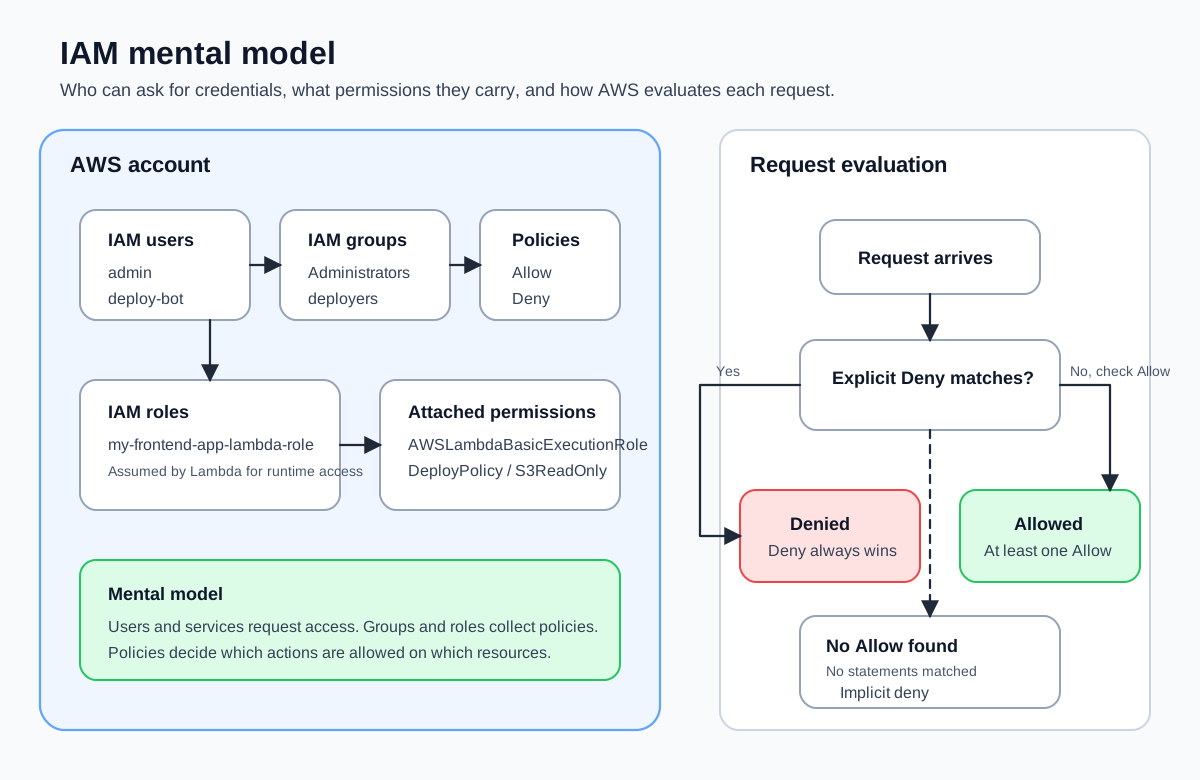
The Four Building Blocks
IAM has four concepts you need to internalize. Everything else is built on top of these.
Users
An IAM user represents a single person or application that needs to interact with AWS. Each user gets their own credentials—a password for console access, or access keys for programmatic access. You created one in Creating and Securing an AWS Account when you set up your admin user.
Users exist within your AWS account. They’re not shared across accounts. If you have three developers who need AWS access, you create three IAM users. (Or you use IAM Identity Center for single sign-on, but that’s more complexity than we need right now.)
Groups
An IAM group is a collection of users. Groups exist purely for convenience: instead of attaching the same five policies to every developer individually, you create a “developers” group, attach the policies to the group, and add each developer to it.
Groups don’t have their own credentials. You can’t sign in as a group. They’re just a container for organizing permission assignments.
A user can belong to multiple groups. If you’re in both the “developers” group and the “deployers” group, you inherit the permissions from both. It works exactly the way you’d expect.
Roles
An IAM role is like a user, but without permanent credentials. Instead of logging in as a role, you assume it temporarily. The role hands back short-lived credentials that expire after a set duration.
Roles are critical for two scenarios:
- AWS services that need permissions. When a Lambda function needs to read from S3 or write to DynamoDB, it assumes a role. The function doesn’t have its own access keys—it borrows permissions from the role every time it runs.
- Cross-account access. A role in Account A can be assumed by a user in Account B. This is how organizations manage access across multiple AWS accounts without sharing credentials.
If users are employee badges, roles are visitor passes: they identify what you’re allowed to do, but they expire and you have to get a new one each time.
Policies
An IAM policy is a JSON document that defines what actions are allowed or denied on which resources. Policies are the actual permission rules. Users, groups, and roles don’t inherently have any permissions—they get them from attached policies.
Here’s the simplest possible policy:
{
  "Version": "2012-10-17",
  "Statement": [
    {
      "Effect": "Allow",
      "Action": "s3:GetObject",
      "Resource": "arn:aws:s3:::my-frontend-app-assets/*"
    }
  ]
}
This says: allow the GetObject action on every object inside the my-frontend-app-assets bucket. We’ll break down every field in Writing Your First IAM Policy.
There are two kinds of policies:
- Identity-based policies attach to users, groups, or roles. They define what that identity can do.
- Resource-based policies attach to a resource (like an S3 bucket). They define who can access that resource.
You’ll encounter both types throughout this course. For now, we’re focused on identity-based policies.
How AWS Evaluates Permissions
Every time you make a request to AWS—clicking a button in the console, running a CLI command, making an SDK call from code—IAM runs an evaluation. The logic is simple but absolute:
Start with a default deny. Every request is denied unless something explicitly allows it. A brand-new IAM user with no policies attached can’t do anything.
Check for explicit denies. AWS looks at every policy that applies to this request. If any policy has a
"Effect": "Deny"statement that matches the action and resource, the request is denied immediately. No allow can override an explicit deny.Check for explicit allows. If no explicit deny was found, AWS checks for a
"Effect": "Allow"statement that matches. If one exists, the request is allowed.If nothing allows it, deny. Back to the default: no explicit allow means implicit deny.
The critical takeaway: explicit deny always wins. If one policy says “allow everything on S3” and another says “deny access to this specific bucket,” the deny wins. Always. This is how you create guardrails that can’t be accidentally overridden.
Request comes in
    → Any explicit Deny? → YES → Request DENIED (game over)
    → Any explicit Allow? → YES → Request ALLOWED
    → Neither? → Request DENIED (implicit deny)
A common mistake is thinking that adding an Allow policy fixes access. If there’s an explicit Deny somewhere—maybe on the user’s group, or an organization-wide policy—no amount of Allow will override it. When debugging access issues, always check for Deny statements first.
How the Pieces Fit Together
Here’s a concrete scenario. You’re deploying a frontend application to AWS and you want a CI/CD pipeline (say, GitHub Actions) to push files to S3 and invalidate a CloudFront cache. Here’s what the IAM setup looks like:
- Create an IAM user called
deploy-bot. This represents the CI pipeline. No console access needed—just programmatic access keys. - Write a policy that allows
s3:PutObjectands3:DeleteObjecton your specific bucket, pluscloudfront:CreateInvalidationon your specific distribution. - Create a group called
deployersand attach the policy to the group. - Add the
deploy-botuser to that group.
Now the deploy bot can push files and invalidate caches—and nothing else. It can’t read your DynamoDB tables. It can’t create new users. It can’t change billing settings. The policy constrains it to exactly what it needs.
If you used roles instead (which is the more modern approach), you’d create a role with the same policy and configure GitHub Actions to assume that role using OpenID Connect. No long-lived access keys required.
The IAM Hierarchy, Visualized
AWS Account
├── IAM Users
│   ├── admin (member of Administrators)
│   └── deploy-bot (member of deployers)
├── IAM Groups
│   ├── Administrators
│   │   ├── Members: admin
│   │   └── Attached policies: AdministratorAccess
│   └── deployers
│       ├── Members: deploy-bot
│       └── Attached policies: DeployPolicy
├── IAM Roles
│   └── my-frontend-app-lambda-role
│       └── Attached policies: LambdaBasicExecution, S3ReadOnly
└── IAM Policies
    ├── AdministratorAccess (AWS managed)
    ├── AmazonS3ReadOnlyAccess (AWS managed)
    └── DeployPolicy (customer managed)
AWS managed policies are policies that AWS maintains for common use cases. They have names like AdministratorAccess, AmazonS3ReadOnlyAccess, and AWSLambdaBasicExecutionRole. They’re convenient for getting started, but they’re often broader than you want in production.
Customer managed policies are policies you write and maintain yourself. They let you be precise about exactly which actions on exactly which resources a user or role needs.
Avoid using the AdministratorAccess managed policy for anything other than your own admin user. Attaching it to a Lambda role or a CI/CD bot means any bug or compromise gives an attacker full control of your AWS account. We cover this in Principle of Least Privilege.
A Quick Analogy for Frontend Engineers
If you’ve worked with RBAC in a frontend app, the mapping is straightforward:
| Frontend RBAC | AWS IAM |
|---|---|
| User account | IAM user |
| Role (admin, editor, viewer) | IAM group or role |
| Permission (can_edit_posts) | IAM policy statement |
| Check at request time | IAM evaluation on every API call |
The main difference: in a frontend application, a misconfigured permission might let someone edit a blog post they shouldn’t. In AWS, a misconfigured permission can let someone spin up expensive compute resources, exfiltrate data from a database, or delete your entire deployment. The evaluation model is the same—the blast radius is different. Very bad stuff.
Now that you have the mental model, let’s write an actual policy from scratch in Writing Your First IAM Policy.