Every DynamoDB table needs a primary key, and the key you choose determines how you access your data for the lifetime of that table. You can’t change a table’s primary key after creation. This is the most important decision you make when designing a DynamoDB table, and it’s worth getting right from the start.
If you want AWS’s version of the table-shape rules while you read, the DynamoDB core components guide is the official reference.
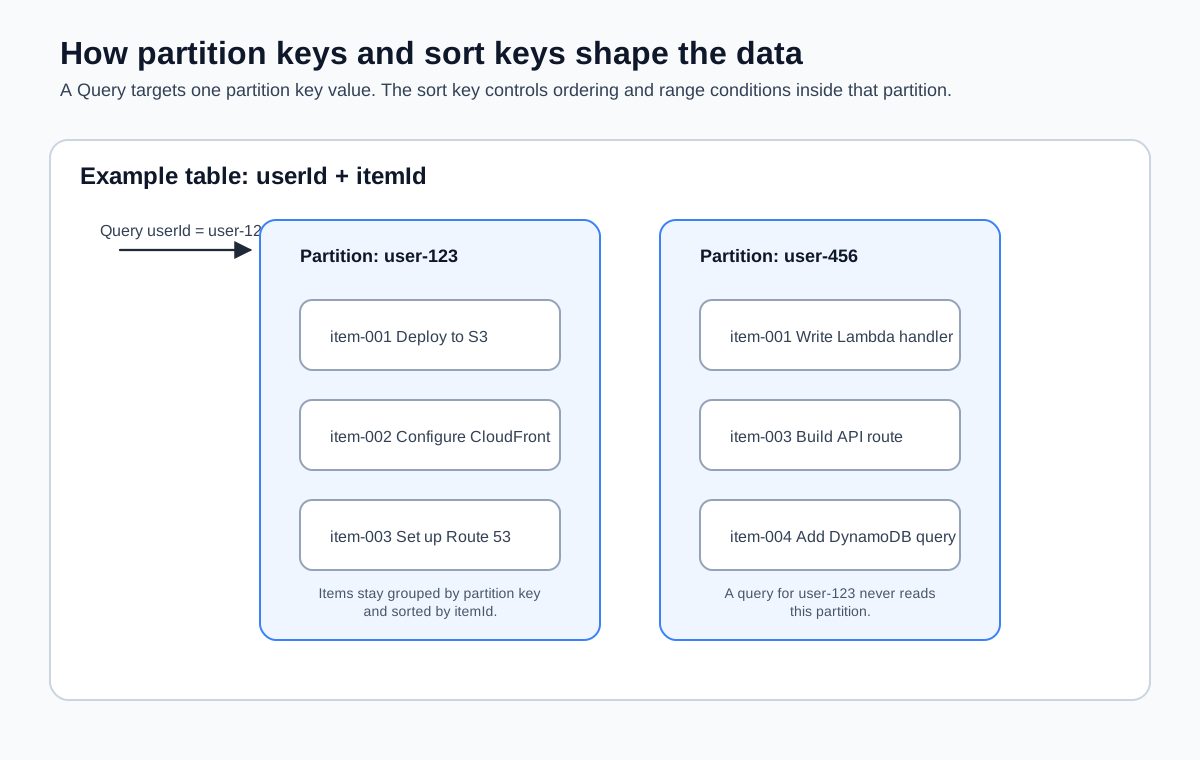
Partition Keys and Sort Keys
DynamoDB supports two types of primary keys:
Simple primary key (partition key only). A single attribute that uniquely identifies each item. DynamoDB uses the partition key’s value to determine which internal partition stores the item. If you’re building a table where each item is accessed by a unique ID—like a users table keyed on userId—a simple primary key is sufficient.
Composite primary key (partition key + sort key). Two attributes that together uniquely identify each item. Items with the same partition key are stored together and sorted by the sort key. This enables range queries: “give me all items with this partition key where the sort key is between these two values.”
The composite key is where DynamoDB gets interesting for frontend applications. Consider a table that stores items for different users:
userId (partition key) | itemId (sort key) | title | status |
|---|---|---|---|
user-123 | item-001 | Deploy to S3 | done |
user-123 | item-002 | Configure CloudFront | in-progress |
user-456 | item-001 | Write Lambda handler | done |
user-456 | item-003 | Set up API Gateway | pending |
With this design, you can:
- Get a specific item: partition key
user-123+ sort keyitem-001 - Get all items for a user: query by partition key
user-123(returns both items, sorted byitemId) - Get a range of items: query by partition key
user-123where sort key begins withitem-00
You can’t efficiently query across partition keys—for example, “get all items with status done across all users.” That requires a scan (which reads every item in the table) or a secondary index. This is the trade-off you accept with DynamoDB: predictable performance on your primary access patterns, at the cost of flexibility on queries you didn’t plan for.
Choosing Good Keys
The golden rule for partition keys: high cardinality with even distribution. Every unique partition key value maps to a physical partition in DynamoDB. If all your data shares the same partition key, it all lands on the same partition, and you hit throughput limits.
Good partition keys:
userId—unique per user, distributes evenlyorderId—unique per order, high cardinality- UUIDs—maximum cardinality by definition
Bad partition keys:
status—only a few possible values (active,inactive), creates hot partitionscountry—low cardinality, and one country likely has far more items than othersdate—all writes on the same day hit the same partition
If you’re coming from a relational database background, think of the partition key as the value you most commonly filter by in a WHERE clause. The sort key is what you’d ORDER BY within that filtered set.
Creating a Table with the CLI
Create the my-frontend-app-data table with a composite primary key—userId as the partition key and itemId as the sort key:
aws dynamodb create-table \
  --table-name my-frontend-app-data \
  --attribute-definitions \
    AttributeName=userId,AttributeType=S \
    AttributeName=itemId,AttributeType=S \
  --key-schema \
    AttributeName=userId,KeyType=HASH \
    AttributeName=itemId,KeyType=RANGE \
  --billing-mode PAY_PER_REQUEST \
  --region us-east-1 \
  --output json
Let’s break down what each parameter does:
--table-name: The name of the table. This is how you reference it in your Lambda code and IAM policies.--attribute-definitions: Declares the data types for key attributes.Smeans string. DynamoDB also supportsN(number) andB(binary), but strings cover most frontend use cases.--key-schema: Defines which attributes form the primary key.HASHis the partition key andRANGEis the sort key. (The naming comes from the internal hashing mechanism DynamoDB uses for partitioning—not the most intuitive labels, I know.)--billing-mode PAY_PER_REQUEST: On-demand pricing. You pay per read and write, with no capacity planning.
The response includes the table description:
{
  "TableDescription": {
    "TableName": "my-frontend-app-data",
    "TableStatus": "CREATING",
    "KeySchema": [
      {
        "AttributeName": "userId",
        "KeyType": "HASH"
      },
      {
        "AttributeName": "itemId",
        "KeyType": "RANGE"
      }
    ],
    "BillingModeSummary": {
      "BillingMode": "PAY_PER_REQUEST"
    },
    "TableArn": "arn:aws:dynamodb:us-east-1:123456789012:table/my-frontend-app-data"
  }
}
Note the TableStatus is CREATING. DynamoDB tables take a few seconds to become active. You can check the status:
In the console, the Create table form shows the table name, partition key, and sort key fields in the Table details section.

aws dynamodb describe-table \
  --table-name my-frontend-app-data \
  --region us-east-1 \
  --output json \
  --query "Table.TableStatus"
Wait until the status changes from CREATING to ACTIVE before writing data.
Once ACTIVE, the table’s Overview tab in the console shows the key schema, capacity mode, and table status.

The --attribute-definitions parameter only defines attributes that are used in the key schema (or secondary indexes). You don’t declare non-key attributes here. DynamoDB is schemaless for non-key attributes—you can add any attributes you want when you write items. This trips up people coming from SQL databases who expect to define all columns up front.
A Note on Attribute Definitions
It’s tempting to list every attribute your items will have in --attribute-definitions. Don’t do this. DynamoDB will reject your request if you define attributes that aren’t part of any key schema or index. Only define the attributes that form your keys.
Your items can have as many additional attributes as you want—title, status, createdAt, priority—and you never declare them in the table definition. You just include them when you write an item.
Key Design Patterns for Frontend Applications
Here are common patterns that work well for frontend API backends:
User-scoped data
Partition key: userId, sort key: itemId
This is the pattern you’re using for my-frontend-app-data. Each user’s items are stored together, and you can efficiently query all items for a given user. This covers the most common frontend access pattern: “show me my stuff.”
Timestamp-sorted data
Partition key: userId, sort key: createdAt (ISO 8601 string)
Items are automatically sorted by creation time. You can query for a user’s recent items by adding a sort key condition: “give me items for user-123 where createdAt is greater than 2026-03-01.”
Entity-type mixing (single-table design)
Partition key: pk, sort key: sk
Advanced DynamoDB users sometimes store multiple entity types in a single table using generic key names. A user might have pk=USER#user-123 and sk=PROFILE, while their items have pk=USER#user-123 and sk=ITEM#item-456. This is a powerful pattern but adds complexity—stick with the simpler user-scoped pattern unless you have a specific reason to go further.
For this course, the userId/itemId composite key is all you need. Single-table design is a real and useful DynamoDB pattern, but it’s optimized for applications with many entity types and complex access patterns. A frontend API backend with one or two entity types doesn’t need that level of sophistication.
You’ve got a table with a composite primary key. Next up, you’ll write data to it and read it back using the AWS SDK v3 from TypeScript—the same language your Lambda handlers are written in.