What You’re Doing
You’re wiring up a host shell and a remote analytics module using Module Federation. The host application (port 3000) loads the analytics dashboard from a separately built and served remote (port 3001) at runtime. Along the way you’ll configure shared dependency negotiation, discover that React Context can’t cross federation boundaries, and solve the cross-boundary communication problem using nanostores.
Why It Matters
Runtime microfrontends give teams independent builds and deploys — but they come with real operational costs. Two dev servers, remote entry manifests, shared dependency negotiation, cross-boundary state management. You need to experience those costs firsthand so you can make an informed architectural decision about whether you actually need runtime composition or whether build-time composition (Exercise 2) is the better fit.
Prerequisites
- Node.js 20+
- pnpm 9+
Setup
pnpm install
pnpm dev
Open http://localhost:3000 (host) and http://localhost:3001 (remote standalone).
Step 1: Explore the Federation Setup
Start by seeing the running application, then understand how Module Federation connects the pieces.
Explore in the Browser
- Open http://localhost:3000
- Open DevTools → Network tab
- Look for
mf-manifest.jsonloading from port 3001 - You’ll also see chunk files loaded from the remote — these are the analytics dashboard’s code, served from the remote’s dev server
You should see the analytics dashboard loading inside the host shell. The sidebar shows “Grace Hopper” with “admin” below it in gray text, and the main area shows the analytics view with stat cards and a chart. In the Network tab, you can see mf-manifest.json and chunk files coming from localhost:3001.

You’ll also notice an amber “Not authenticated” badge in the analytics dashboard header — even though the sidebar shows a logged-in user. This is intentional. It’s the bug you’ll investigate in Step 3 and fix in Step 4.
Now let’s look at the configuration that makes this work.
What to Look At
- Open
host/rsbuild.config.tsand find theremotesconfiguration:
remotes: {
  remoteAnalytics:
    "remoteAnalytics@http://localhost:3001/mf-manifest.json",
},
This tells the host where to find the remote’s module manifest at runtime. The manifest (mf-manifest.json) is the contract between host and remote — it lists every module the remote exposes, which JavaScript chunks implement them, and which shared dependencies the remote declares. The host fetches this JSON file at runtime, before loading any remote code, so it knows what’s available and can negotiate shared dependencies. This is why both dev servers must be running simultaneously: the host makes a network request to port 3001 on every page load.
You already saw mf-manifest.jsonin the Network tab. That request is Module Federation’s runtime negotiation in action — the host and remote agree on shared dependencies and available modules before any remote code executes.
- Open
remote-analytics/rsbuild.config.tsand find theexposesconfiguration:
exposes: {
  "./analytics-dashboard": "./src/analytics-dashboard",
},
This declares which modules the remote makes available to consumers. Think of exposes as the remote’s public API surface — only paths listed here are importable by consumers. The key on the left ("./analytics-dashboard") becomes the import path consumers use (e.g., import("remoteAnalytics/analytics-dashboard")), and the value on the right is the actual source file.
- Open
host/src/app.tsxto see the dynamic import:
const AnalyticsDashboard = React.lazy(() => import('remoteAnalytics/analytics-dashboard'));The host loads the remote’s component lazily at runtime — it’s not bundled into the host’s build. React.lazy paired with a dynamic import() means the browser only downloads the remote’s JavaScript bundles when <AnalyticsDashboard /> first renders, not at initial page load.
- Open
host/src/index.tsx— notice it’s justimport("./bootstrap"). This async boundary is required for Module Federation’s shared module negotiation to work. Without it, eager shared modules fail to resolve.
Why index.tsx only contains a dynamic import:Module Federation’s shared module negotiation is asynchronous — the runtime must contact all registered remotes and resolve which version of each shared dependency to use before any application code can run. If index.tsx imported application code synchronously, that code would execute before negotiation completed and you’d get a runtime error: Uncaught Error: Shared module is not available for eager consumption. The dynamic import("./bootstrap") defers everything until the federation runtime is ready.
Checkpoint
You’ve seen the running app in the browser and understand the configuration that powers it: the host’s remotes pointing at the manifest URL, the remote’s exposes declaring its public modules, the lazy dynamic import in the host, and the async boundary in index.tsx.
Step 2: Shared Dependency Negotiation
Both the host and remote use React. Without shared dependency configuration, each would bundle its own copy — which breaks hooks, context, and everything else that depends on a single React instance.
What to Look At
- In both
rsbuild.config.tsfiles, find thesharedconfiguration. Both files setsingleton: trueandeager: trueon all shared dependencies:
shared: {
  react: { singleton: true, eager: true },
  "react-dom": { singleton: true, eager: true },
  nanostores: { singleton: true, eager: true },
  "@nanostores/react": { singleton: true, eager: true },
  "@pulse/shared": { singleton: true, eager: true },
},
singleton: true— Only one copy of React loads, even if the host and remote declare different versions. The Module Federation runtime selects the highest compatible version available and enforces that exactly one copy is used. Without this, each participant loads its own copy, which breaks anything that depends on a single module instance: React hooks, Context, and stores all fall into this category. This constraint is global — if any participant declares a module as a singleton, the runtime enforces it for everyone, so a host can protect its integrity even if a remote forgets to set it.eager: true— Both sides load shared modules immediately. Withouteager: true, a remote expects the host to provide shared modules like React at runtime. That works when loaded through a host, but means the remote can’t boot on its own — it has nowhere to get React from.eager: truebundles React directly into the remote’s output as a self-contained fallback. The federation runtime still deduplicates at runtime when the host is present, so you won’t end up with two React copies in production;eagerjust ensures standalone mode (localhost:3001) stays functional.
@nanostores/reactappears in the remote’s shared config even though it isn’t in the remote’spackage.jsonyet — this is intentional. It’s pre-configured so that when you install the package in Step 4c, federation deduplication is already in place. You won’t need to touch the config later.
- Experiment: Add
requiredVersionandstrictVersionto your existing React entry in the remote’srsbuild.config.ts. Keepsingleton: trueandeager: truein place — only add the two new fields:
shared: {
  react: {
    singleton: true,
    eager: true,
    requiredVersion: "^19.0.0",
    strictVersion: true,
  },
  // ... other shared entries unchanged
},
With strictVersion: true, Module Federation throws an error if the provided version doesn’t satisfy requiredVersion. Using "^19.0.0" here will trigger the error because this project uses React 18. Stop your dev servers (Ctrl+C), run pnpm dev again, then open http://localhost:3001. The page will go blank (React never starts), and you’ll see the version mismatch in DevTools → Console:
This is intentional — the remote rejected the available React version before any UI could render. This is how you catch version drift between independently deployed remotes.

Remove both fields and restore the original config before continuing. Stop your dev servers and run pnpm dev again to pick up the reverted config.
Checkpoint
Console should be clean — no shared module errors. Only one copy of React is loaded. If you have React DevTools installed, you’ll see a single React tree spanning both host and remote components.
Note on
[Federation Runtime] Warnmessages: You may see these in the console throughout the exercise. They appear whenever a shared dependency is configured without an explicitrequiredVersion(which is the case for most entries in our shared config). They are not errors — just informational messages from the Module Federation runtime about version negotiation. You can safely ignore them.
Step 3: The Auth Context Problem
Now look at the analytics dashboard more carefully. Something is wrong.
Spot the Bug
- Look at the sidebar navigation — it shows “Grace Hopper” with role “admin”. The host has auth data.
- Look at the analytics dashboard header — it shows an amber “Not authenticated” badge. The remote does not have auth data.
Why This Happens
Open host/src/shell/auth-provider.tsx. The host fetches the current user from /api/users/me and provides it via React Context:
const AuthContext = createContext<AuthContextType>({ ... });

export function AuthProvider({ children }) {
  // Fetches user, provides via context
  return <AuthContext.Provider value={value}>{children}</AuthContext.Provider>;
}
Now open remote-analytics/src/analytics-dashboard.tsx. Find the hardcoded auth values near the top of the component:
// THE BUG: This component has no access to the host's auth context.
// It cannot read the current user or auth token.
// On the main branch, this is intentionally broken.
const isAuthenticated = false;
const userName: string | null = null;
The remote has no way to access the host’s React Context. Even though <AnalyticsDashboard /> renders inside the host’s <AuthProvider>, the component code was built separately. React Context doesn’t cross Module Federation boundaries — the remote’s React module resolution sees a different context object than the host’s.
React Context is matched by object identity, not by type.When the host calls createContext(...), it gets back a specific JavaScript object — call it ContextA. When the remote’s separately built bundle also calls createContext(...) (or imports what appears to be the same context from a shared file), it gets a different JavaScript object — ContextB. React’s useContext hook works by walking up the component tree to find a <Context.Provider> whose context object is === to the one passed in. The host’s <AuthContext.Provider> provides ContextA; the remote’s useContext(AuthContext) asks for ContextB. They never match — so the remote always reads the default value.
You might think: “Export the context from @pulse/shared and import it in both places.” Even that won’t work — React Context identity is based on the module instance, not the type. TypeScript types are erased at compile time; at runtime, what matters is whether two pieces of code received the same JavaScript object. With Module Federation, unless a package is declared as a singleton shared dependency, the host and remote evaluate it independently — createContext() runs twice, producing two distinct objects. Moving createContext into a shared package doesn’t help unless that package is itself a singleton shared module.
Checkpoint
You understand why the analytics dashboard shows “Not authenticated” — React Context trees don’t span federation boundaries. The host has auth data but the remote can’t access it through React’s built-in mechanisms.
Step 4: Cross-Boundary Communication
The solution is to use a framework-agnostic state management library that both the host and remote can share. nanostores is already installed in @pulse/shared — you just need to create the store and wire it up.
4a: Create the Auth Store
Create a new file shared/src/auth-store.ts (note: auth.ts already exists in that directory — it holds broadcast channel utilities and is unrelated to what you need here):
What is a nanostore atom?An atom is the simplest primitive in nanostores — a reactive container for a single value. Calling atom(initialValue) returns a store object with three methods: .get() to read the current value, .set(newValue) to write a new value and notify all subscribers, and .subscribe(callback) to listen for changes. The useStore hook from @nanostores/react wraps .subscribe() in a React hook, re-rendering the component whenever the atom’s value changes. The atom itself has zero React dependency — it’s plain JavaScript, which is precisely why it can cross framework and federation boundaries that React-specific primitives cannot.
import { atom } from 'nanostores';
import type { AuthContext } from './types';

export const authStore = atom<AuthContext>({
  user: null,
  isAuthenticated: false,
  token: null,
});
Then add the following export to shared/src/index.ts:
export * from './auth-store';4b: Write to the Store from the Host
Open host/src/shell/auth-provider.tsx. Import the store and update it when auth state changes.
Add a second import from @pulse/shared — keep it separate from the existing type-only import, since this one is a runtime value:
TypeScript’s
import typesyntax is erased entirely at compile time — it exists only for type checking and produces no JavaScript output. A runtime value likeauthStorecannot be included in animport typestatement. Keeping them as two separateimportlines is the clearest way to signal which imports are type-only and which carry runtime code.
import type { User, AuthContext as AuthContextType } from '@pulse/shared';
import { authStore } from '@pulse/shared';
Inside the useEffect, write to the nanostore immediately after the two existing state calls in the try block:
try {
  const response = await fetch('/api/users/me');
  const data: User = await response.json();
  setUser(data);
  setToken('mock-jwt-token-' + data.id);
  authStore.set({
    user: data,
    isAuthenticated: true,
    token: 'mock-jwt-token-' + data.id,
  });
} catch (error) {
  console.error('Failed to fetch current user:', error);
}
4c: Read from the Store in the Remote
First, add @nanostores/react to the remote so it can use the React bindings. In a separate terminal (not the one running pnpm dev), run from the repo root:
pnpm --filter @pulse/remote-analytics add @nanostores/reactWhy? pnpm uses strict module isolation — each package can only import its own declared dependencies. Even though
@pulse/sharedalready depends on@nanostores/react, the remote needs its own declaration to resolve the import at build time. At runtime, Module Federation’s singleton config ensures only one copy is loaded.
Now open remote-analytics/src/analytics-dashboard.tsx. Replace the hardcoded auth values with the nanostore.
Add these imports:
import { useStore } from '@nanostores/react';
import { authStore } from '@pulse/shared';
Inside the component, find and delete the // THE BUG comment block and the two hardcoded const lines below it, then replace them with the nanostore:
// Delete these five lines:
// THE BUG: This component has no access to the host's auth context.
// It cannot read the current user or auth token.
// On the main branch, this is intentionally broken.
const isAuthenticated = false;
const userName: string | null = null;
// Add these three lines in their place:
const auth = useStore(authStore);
const isAuthenticated = auth.isAuthenticated;
const userName = auth.user?.name ?? null;Why This Works
Two things make this work:
@pulse/sharedis a singleton shared dependency in both rsbuild configs. This means the host and remote share the exact same module instance of@pulse/sharedat runtime — so theauthStoreatom created byatom(...)inauth-store.tsis the same object in both the host and the remote.nanostoresand@nanostores/reactare also singleton shared dependencies. This ensures the store library and its React bindings are the same instance on both sides, souseStore()in the remote subscribes to the same atom the host writes to.
When the host calls authStore.set(...), the remote’s useStore(authStore) hook sees the update immediately — because they’re literally the same object in memory.
The singleton connection is load-bearing.Every piece of this solution depends on @pulse/shared being declared as a singleton shared dependency in both rsbuild configs. If it were missing from shared, Module Federation would bundle a separate copy of @pulse/shared into both the host and the remote. The host’s authStore.set(...) would write to one atom object; the remote’s useStore(authStore) would subscribe to a completely different atom object that never receives any updates. You’d see “Not authenticated” forever, with no error and no obvious cause. The same applies to nanostores itself — if the library that implements .subscribe() and .set() were duplicated, subscriptions established against one copy would be invisible to the other. All three packages — @pulse/shared, nanostores, and @nanostores/react — must be singletons for cross-boundary reactivity to work.
If the badge still says “Not authenticated” after making these changes, check that
@pulse/sharedis listed in thesharedconfig in bothrsbuild.config.tsfiles. Without it, each side bundles its own copy of@pulse/sharedand creates separate atom instances — the host writes to one atom while the remote reads from a different one.
This is the key insight: framework-agnostic state (nanostores, BroadcastChannel, custom events) crosses boundaries that framework-specific state (React Context) cannot — but only if the module that creates the state is shared across both sides.
Stop your dev servers (Ctrl+C) and run pnpm dev again to pick up the new file, the new export, and the newly installed dependency. Then open http://localhost:3000.
Checkpoint
The analytics dashboard now shows a green “Viewing as: Grace Hopper” badge instead of the amber “Not authenticated” badge. The auth context flows from the host to the remote through the shared nanostore.

Stretch Goals
BroadcastChannel alternative: Implement the same cross-boundary communication using the browser’s
BroadcastChannelAPI instead of nanostores. Look atshared/src/auth.ts— it already definesAUTH_CHANNELand anAuthEventinterface as a starting point. BroadcastChannel works across browser tabs too, not just federation boundaries.Error boundary limitations: Stop the remote dev server and reload the host — you’ll see a blank white page, not the error boundary fallback. Check the console: you’ll find
ERR_CONNECTION_REFUSEDonmf-manifest.jsonfollowed by aFederation Runtimeerror. This is expected behavior. Module Federation’s manifest fetch is part of the eager shared module negotiation that runs before React mounts. When the remote is completely unreachable, the federation runtime throws beforecreateRootis ever called — so the ReactErrorBoundarynever gets a chance to render.Standalone remote: Visit http://localhost:3001 directly. The analytics dashboard works independently with its own MSW mock data — it doesn’t need the host at all. Notice it shows “Not authenticated” in standalone mode since there’s no host to write to
authStore.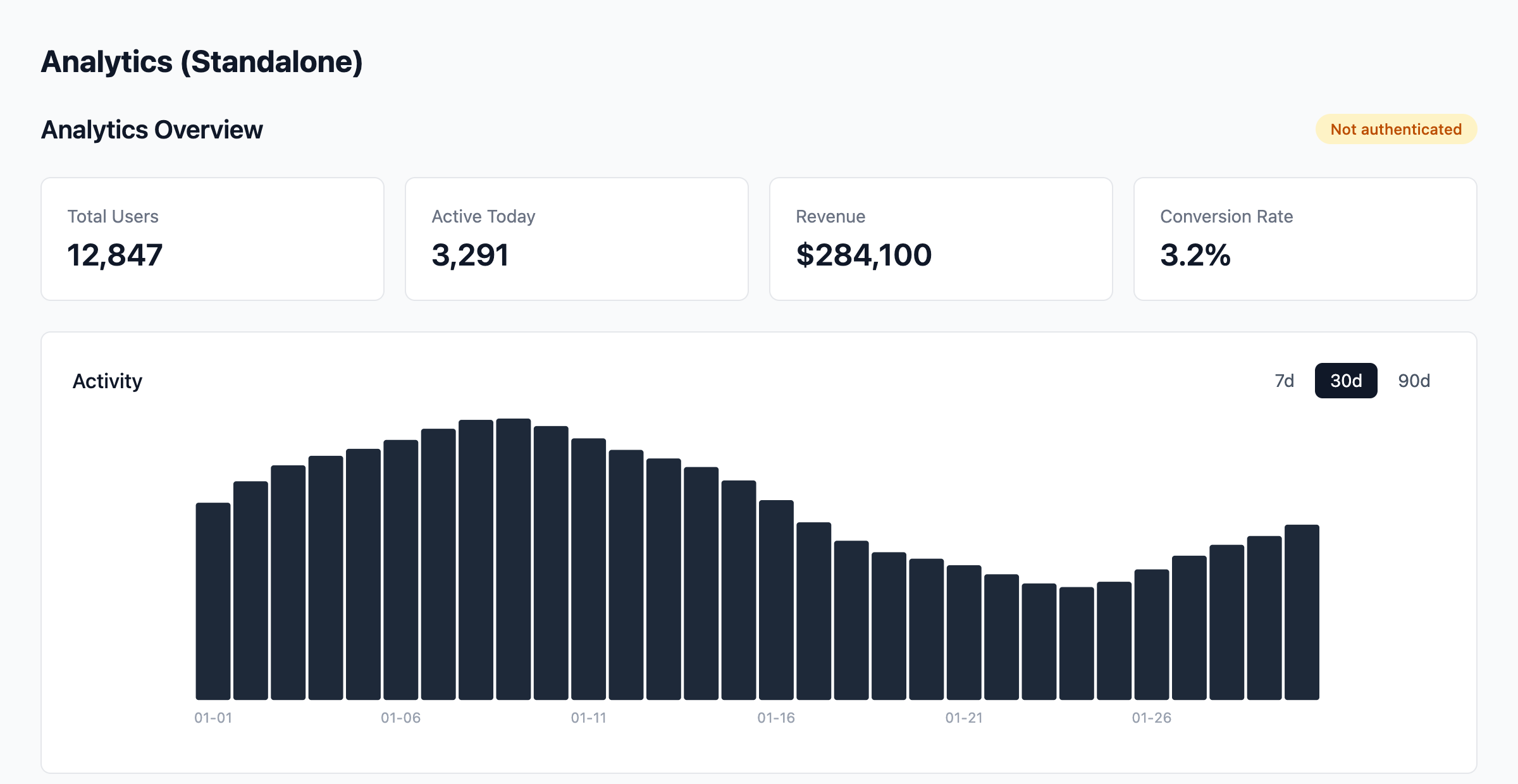

Solution
The completed implementation is on the solution branch:
git checkout solutionWhat’s Next
You’ve felt the operational overhead of runtime composition: two dev servers, remote entry manifests, shared dependency negotiation, cross-boundary state management. The natural follow-up question is: what if you consumed this same analytics module as a regular package in a monorepo — no federation, no remote entry, no shared dependency negotiation? Same product, radically simpler architecture. That’s the trade-off build-time composition explores.